
Short answer. For one documentation flow, compare three routes before you build anything: work in the existing EHR, use an existing connector or embedded view, or call a permitted API operation. For each route, name the exact operation and destination, say where each component runs (capture, transcription, drafting, review) and who operates it, and record what evidence will show which version reached the receiving system. Where you cannot name one of these, write "unknown" and ask the owner who can.
Start with the route needing the least new access as the comparator. Consider a connector or API when the operation and destination are named and the saved version can be checked; a route with no identifiable destination is not ready for that comparison.
This guide is for the founder or product lead of a clinical AI product who is working with clinical and IT partners on one flow, such as preparing a draft note, correcting it and placing the corrected version in a destination. A successful API response and a changed note are different things; the sections below show a documented case where they differ.
Findings here are documented (public documentation), invented (the heading sequence) or unknown. This technical planning walkthrough reports no deployment, test or clinical evaluation.
Which EHR boundary can this documentation flow use?
Hold the source and intended corrected note constant. Compare manual saving, a supported connector/view and a permitted API operation. Name the destination, access type and saved-version evidence for each. SMART delegated access remains constrained by underlying policies; see SMART App Launch scopes and launch context.
| Route for the same flow | Boundary to establish | Still to establish |
|---|---|---|
| Manual / existing EHR | Where a person edits and saves | Which version was saved in which destination |
| Existing connector / embedded view | Display, transfer or native creation? | Whether the intended receiving record changed |
| Permitted API | Exact read, search, create or update operation | Local permission, content and receiving state |
How to choose—editorial advice, not a validated method. Manual work fits low volume when a person reads each note, but copying can introduce version drift. A supported connector fits the exact operation, but a display-only view does not establish a changed record. An API comparison needs named operation, permission, destination and saved-version evidence; transport success alone is weak evidence. At high volume manual work can remain the baseline without being the preferred operating route. These prompts do not replace clinical, IT or institutional acceptance.
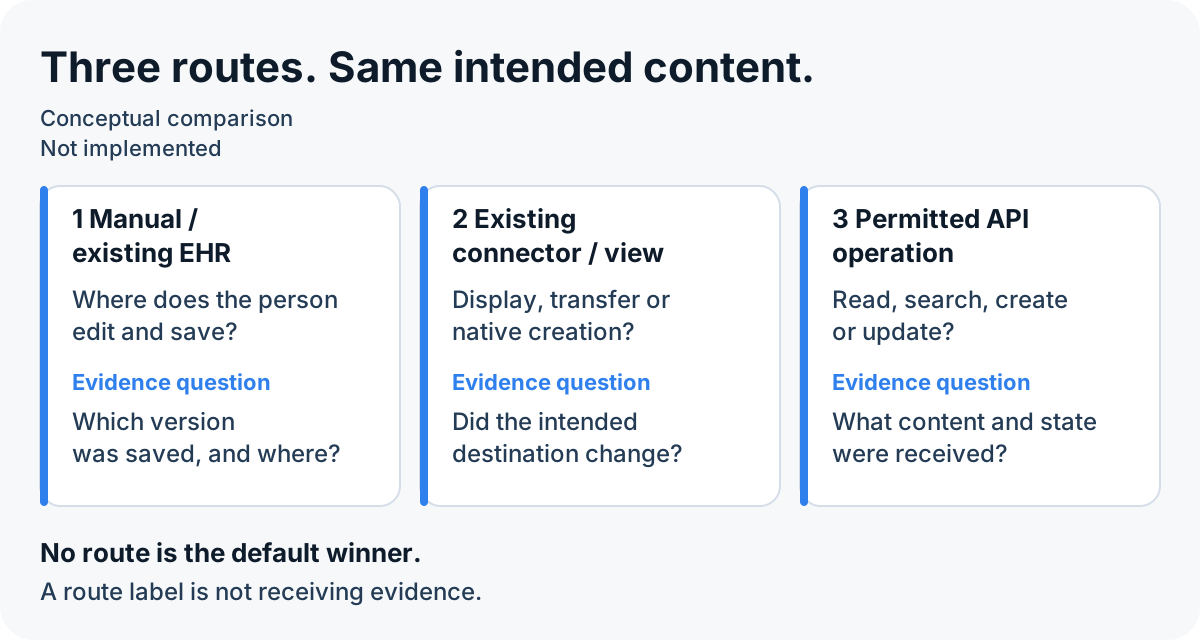
Permissions do not establish a saved note
The SMART App Launch 2.2.0 specification says delegated access remains limited by underlying policies and permissions. Requested interactions may be rejected or results omitted. The interface owner must establish the actual operation, access type and saved-version evidence.
Where can processing run for that boundary?
Record location, operator and tool version separately for capture, transcription, drafting, review and receiver, plus storage, logs, support and licensing paths. Have the institutional owners assess access and retention conditions for the actual configuration.
| Processing option | What it describes | Operating question to carry forward |
|---|---|---|
| Local / on-device | A named component runs on the device | Who maintains it, and what leaves it? |
| Private / on-premises | A named component uses customer-controlled infrastructure | Who operates updates, backups and dependencies? |
| External processing | A named component runs in a provider service | What is sent, retained and accessible, for which purpose? |
What stays a draft, who reviews it, and what reaches the EHR?
Trace source, generated draft, correction and intended receiving version separately. The invented heading sequence ends before transmission; actual receiving version is unknown. Confirm saved content with the clinical owner and interface evidence. Oracle's narrow case below distinguishes success status from changed content; the heading sequence demonstrates no interface.
| Version | Illustration | Evidence status |
|---|---|---|
| Source vA | Heading: Background | Invented source |
| Draft vB | Heading: Overview | Invented draft |
| Editorial correction vC | Heading: Background | Invented editorial correction, not clinical confirmation |
| Proposed receiving vD | Intended heading: Background | Not sent; actual received version UNKNOWN |
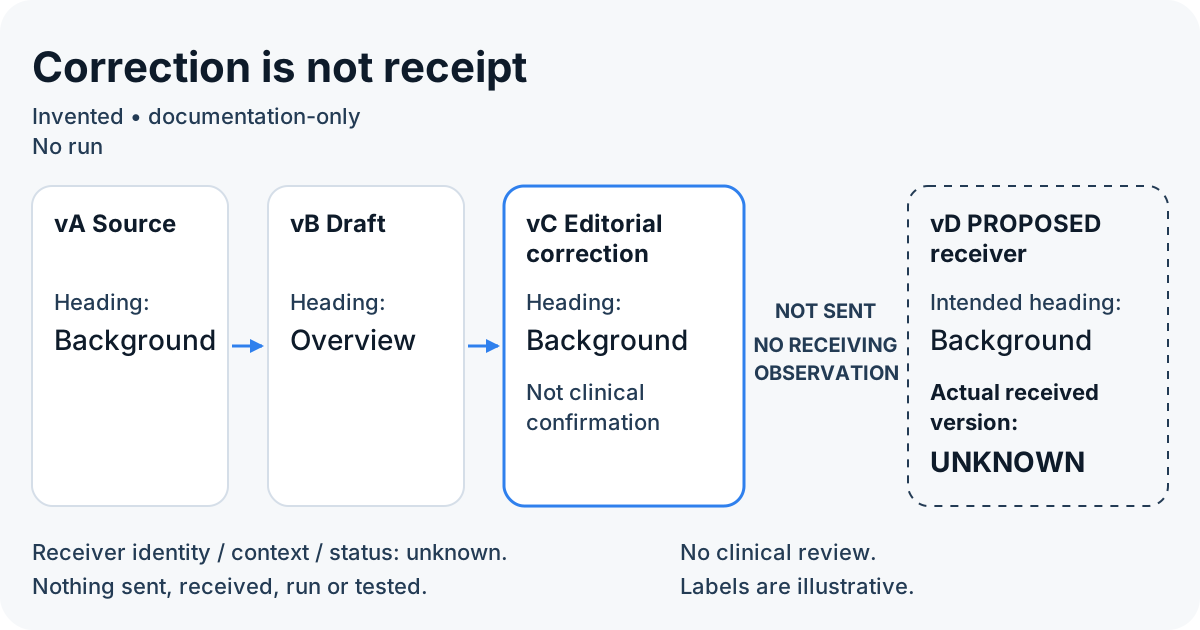
Oracle's DocumentReference update operation documents `If-Match` as the current resource version. Its response section says that when `docStatus` or `status` is updated with `entered-in-error`, the original document is not updated, new content is ignored and `200` is still returned. This is a deliberate status operation, marking a document entered-in-error, not evidence that ordinary corrections fail. Ask for saved-version evidence for the actual operation. This article has not executed or tested it.
What must your clinical and IT owners still establish?
Complete the record with clinical, IT/interface and product owners. Label each finding documented, provider-reported, proposed, observed, tested, approved or unknown. Distinguish draft latency from time to a corrected saved version by stating start/end events; the owners set acceptable criteria.
| Record field | Information to bring or leave explicitly unknown |
|---|---|
| Source and versions | Source locator/version; draft, correction and proposed receiver versions; actual received version if evidenced |
| Route and operation | Manual, connector/view or API; exact operation; interface and enabled version |
| Receiver | External view, mock endpoint or proposed native destination; identity, context, status and supporting evidence |
| Processing | Each component's location, operator and tool version; storage, logs, support and licensing dependencies |
| Data conditions | Purpose, access and retention questions; institutional conditions and evidence available |
| Consent and authority | Which purpose and activity need consideration; who can establish the applicable authority and evidence? |
| Timing | Start event, end event, environment and version; observed or unmeasured; acceptable timing still for owners to establish |
What changes the scope of the technical work?
The scope depends on the number of EHR environments and interfaces involved; whether the route is manual, a connector or an API operation; how many components run in different places and who operates each; which review steps and evidence the owners need; how many clinical, IT and institutional approvers are involved; and who takes over the work afterwards. Time and cost follow from these factors and are discussed with the curator; this page gives no figures.
Boundaries
This planning walkthrough reports public documentation and an invented heading sequence, not an executed integration or clinical evaluation. Actual receiving version is unknown. Clinical suitability, consent, data use, security and regulatory classification stay with the clinical, IT, institutional and qualified specialist owners. Vendor documentation describes its stated operation; local enabled behavior needs evidence.
Grand Rounds is an initiative of Dinarys, and a conversation may lead to cooperation with Dinarys.
Next step
Compare one permitted flow with clinical and interface owners. Identify the receiving operation and how the saved corrected version can be checked. To discuss technical support, bring that record to the curator.